Connecting Claude to Odoo: the MCP connector we use every day.
An AI that cannot see your customers, orders or history stays a generic assistant. With our MCP connector, Claude works on your real Odoo.
Many companies already use ChatGPT, Gemini or Claude to draft and summarise. The problem is that this AI does not know your business: it cannot see your customers, your orders or your history, so someone has to copy data from Odoo into the chat and paste the result back by hand. That integration happens in one person's head, and it costs time every day.
To remove that manual bridge, Dynapps connected Claude to Odoo through our own MCP connector. With it, Claude reads and works with the real data in your Odoo, while your team sets the intent, validates and decides. Here you will read what MCP is, how our connector works, what you can do with it and how it fits with what Odoo 20 brings.
What MCP is and why it matters for your Odoo.
MCP (Model Context Protocol) is an open standard that lets an AI work with an external system: read its data, run actions and return results. It is the bridge between the assistant and your applications.
Without that bridge, the AI is a general assistant with no context about your company. With it, Claude can look up a customer in your Odoo, review their orders, prepare a quotation or analyse your pipeline with the real figures, not the ones someone pastes into the chat.
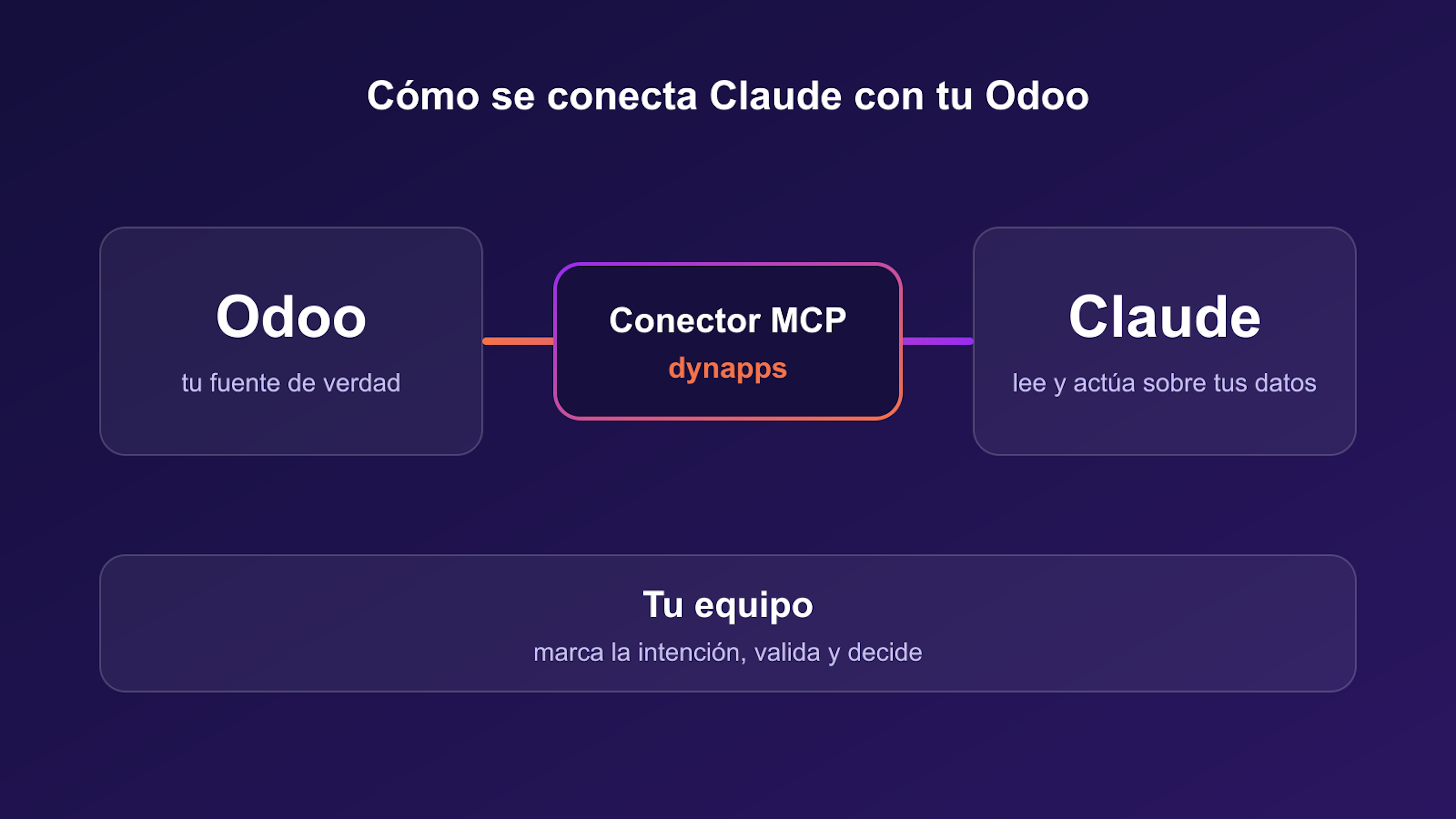
The idea is one layer with three levels and a single direction:
Odoo, the source of truth: customers, products, orders, invoices, stock.
Claude, which reads and acts on that real data.
Your team, which sets the intent, validates what the AI proposes and decides.
How the Dynapps MCP connector works.
Our connector is an Odoo module from Dynapps Core, our library of in-house modules. It installs in your Odoo and turns your database into an MCP server that Claude can connect to. Today it works on Odoo 17, 18 and 19.
The connection is set up once per company, in four steps:
We install the MCP server module in your Odoo, on the branch that matches your version.
We register an OAuth client in your Odoo's technical settings. That is the door Claude will use.
We generate the credentials. Odoo shows the secret only once and stores only a hash, so nobody can read it again; if it is lost or needs rotating, it is regenerated.
We add them to the Claude connector and run a test query to check that it returns data from your Odoo.
From then on, your team works with Claude in Cowork, Claude's desktop app for office work, or on claude.ai, next to the tools it already uses. To roll skills out to the whole team, you need a Claude Team or Enterprise plan.
Permissions and security: Claude sees what you decide.
Connecting an AI to your ERP raises a fair question: what can it see and what can it change? Our connector runs with controlled permissions, the ones you define, and the connection uses OAuth, the same standard business applications use to authorise access without sharing passwords.
When our team works with Claude in a customer's environment, it also follows an internal rule: access keys are never permanent. They last one day by default and one week at most, carry a name that shows who created them and when, and are revoked when the task is done, even if they have not expired.
And the connector does not tie you to one provider. We built it around Claude because it is the model we recommend for business tasks on company data, but you can also connect a model such as Gemini if your team already works with it.
What your team can do with Claude connected to Odoo.
Claude handles recurring work best when you package it as skills: practical knowledge of a specific task, so Claude does it the same way every time and follows your good practice. You describe what you want in plain language and Claude picks the right skill. These are examples from our catalogue, all working on real Odoo data:
Sales: qualify new leads against your ideal customer profile and assign them to the right salesperson, review the pipeline with a forecast and alerts on stalled opportunities, or turn an opportunity into an Odoo order with its sales proposal.
Customers and support: a ticket diagnosis with an empathetic reply and an action plan, or a churn risk score per customer based on the tone of their tickets.
Finance: a quarter-end accounting audit with nine checks on journal entries, VAT and bank, a forecast in Excel with scenarios, or a proposal for the correct journal entry with a warning on errors.
Purchasing and products: a supplier ranking based on actual lead times, prices and incidents, or a product sheet and SEO text from its product code.
On top of that, every company gets its own brand skill: colours, typography, tone and house style, so everything Claude writes carries your identity from day one.
We use it in our own Odoo before we offer it.
We set up this connector in Dynapps' own Odoo before taking it to customers. Today Claude prepares our quotations, builds our CRM reports and runs the quarter-end checks on real data. What we install at your company is what we already use every day.
One customer example from Spain is Prima Protección, which connected Claude to its Odoo: every week an agent prepares the purchase orders to Asia, and customer emails arrive with a draft reply for a person to validate. Today almost 20% of each department's time is already work done with AI.
The Dynapps connector and the MCP in Odoo 20.
Odoo 20 comes with its own MCP server, so Claude, ChatGPT or another MCP client can work with your database. We cover it on our AI in Odoo 20 page. In practice, the difference is timing and scope:
If you are on Odoo 17, 18 or 19, our connector gives you the link to Claude today, without waiting to migrate.
If you are moving to Odoo 20, the skills, the brand skill and the way of working you set up now keep their value: the connection changes, the method does not.
In both cases, what makes the difference is not the connector but the skills built on your processes, and a team that knows how to use them.
If you want to know what the AI built into Odoo does, see our Odoo AI page.
How to get started: the AI Starter Pack.
The connector is one of the parts of our AI Starter Pack, a six-week project with a fixed scope that leaves your company with its own working AI ecosystem:
The MCP connector between Claude and your Odoo, with controlled permissions.
Your brand skill and three skills of your choice from the catalogue, built and tested on your real data, with documentation.
A GitHub repository for your skills, and Cowork installed on your team's computers.
AI training for up to eight people, two review sessions and a governance document covering roles, approvals and data security.
You will find the details on our AI and automation for Odoo page. And if you want to see which three skills would have the most impact on your team, talk to an expert.
The most common questions we get about Claude and Odoo.
It is a module that turns your Odoo into an MCP (Model Context Protocol) server, the standard that lets an AI like Claude read data and run actions in an external system. With it, Claude works on your real customers, orders and invoices instead of whatever you paste into a chat.
Odoo 17, 18 and 19. Odoo 20 also ships with its own MCP server, so if you plan to migrate, the skills you build now keep working.
To share skills with your whole team from Cowork, you need a Claude Team or Enterprise plan. On an individual plan you can still use them, but they do not reach the rest of your team.
Not necessarily. The connector is set up with the permissions you define, and the connection is authorised through OAuth, without sharing passwords. The credentials can be regenerated at any time from the Odoo settings.
We build it around Claude because it is the model we recommend for business tasks on company data, but the connector is not limited to Claude: a model like Gemini can be connected too.
The connector is set up once per company. Within the AI Starter Pack, the full project, with the connector, the brand skill, three skills and training, takes six weeks.
Connect Claude to your Odoo.
We install the MCP connector in your Odoo, connect it to Claude with the permissions you define and build the first skills with you on your real data. We use it every day in our own Odoo before we offer it. We are an Odoo Gold Partner, with 280+ Odoo experts.